
Canonical link is one of the most important parts of SEO. When implemented correctly, they can boost your website’s SEO performance and help search engine crawlers navigate your site more efficiently. In this article, we’ll show you how to set canonical URLs easily.
Table Of Contents
What is a Canonical Link (Canonical URL)
A canonical link is an HTML tag with the attribute rel=”canonical” that appears in the <head> section of your webpage. It looks like this:
<link rel="canonical" href="https://koolak.net/canonical-link-guide" >A canonical URL tells search engines which URL should be considered the “main” or “preferred” version of a page. You might wonder: why would we need to declare the URL of the page we are already on in the HTML? The answer is simple: this tag helps Google (and other search engines) understand the canonical, or primary, version of a page.
In other words, search engines use the canonical tag to determine which URL should represent the original content.
Can a Page Have Multiple URLs?
Yes, and this happens more often than you might think. There are many situations, especially in modern web frameworks, where a single piece of content ends up being accessible through multiple links. Let’s look at some common scenarios:
Different Domains for the Same Content
Sometimes a site may be available through multiple domains- for example, both domain A and domain B. While this is usually a mistake, in some cases (such as during a company rebrand), it may be intentional. In such cases, using a canonical link ensures that Google recognizes which domain is the primary one.
Different Protocols or Subdomains (HTTP vs. HTTPS, www vs. non-www)
A site might be accessible at:
http://example.com
http://www.example.com
Although this is considered a bad practice and should be fixed at the server level, canonical links can still be used to specify the correct URL.
Example: If the canonical link of this post is set to:
https://koolak.net/canonical-link-guide
then search engines will recognize this as the primary version.
Important note: If your site loads with both www and non-www, or with both http and https, you should fix this issue. Contact your hosting provider or developer to configure proper redirects. we also have a wordpress http to https redirect guide in our website.
Marketing & Landing Pages
Sometimes you might create a special landing page for advertising campaigns. If that page doesn’t have unique content and is simply a different presentation of an existing page, you should set the canonical link to the main content page. This prevents duplicate content issues in search engines.
Archive Pages in WordPress (or Similar CMS)
For example, in WordPress, a category archive may be available both at:
/category/category-name/
/category/category-name/page/1/
In this case, the canonical should point to the main archive URL (/category/category-name/).
How to Choose the Canonical URL
The rule is simple: the canonical page should always be the main, original version of your content – the one you want Google to index and show in search results.
If you have both a campaign landing page and a category page, the category page should usually be canonical.
If a page is accessible via /category/category-name/ and /category/category-name/page/1/, the canonical should point to /category/category-name/.
Do you need canonical Tag on Every Page?
Yes, it’s recommended to have a canonical tag on all important pages. Even if the page has only one version, the canonical tag reassures search engines which URL is the official one.
How to Set a Canonical Link
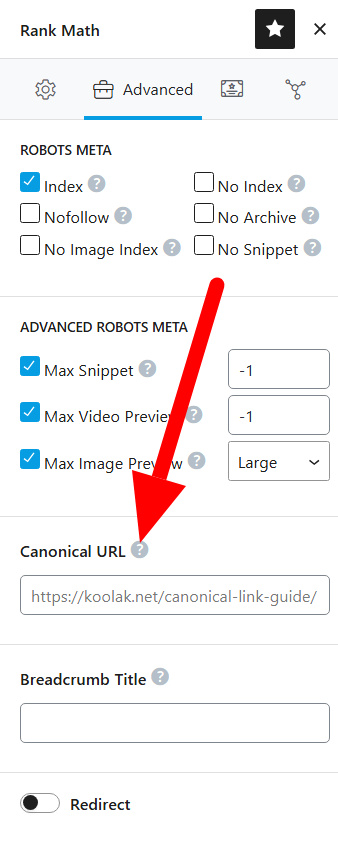
In WordPress: SEO plugins like Yoast SEO or Rank Math automatically add canonical tags to posts, pages, products, categories, etc. They generally make the right choice automatically, but you can manually edit the canonical URL if needed.
In frameworks like Laravel (or others): You’ll need to add canonical tags manually in your layout or template files. This is usually a developer’s task.
Best Practices and Common Mistakes
Remember: when you set a canonical tag, search engines ignore the current URL and instead focus on the canonical one.
A common mistake is setting all paginated archives (page 2, page 3, etc.) to canonicalize to page 1. This is wrong because those pages contain unique articles that deserve to be indexed. By doing so, you would hide valuable content from Google and harm your SEO.
In short: canonical tags are powerful, but they should be used carefully. They ensure that search engines understand your preferred URL and prevent duplicate content issues – without accidentally hiding important pages from Google.
FAQs About Canonical Link and how to use them properly
Q: What is the purpose of a canonical link?
A: A canonical link tells search engines which version of a page should be treated as the main or original version. This prevents duplicate content issues and ensures that your preferred URL is indexed.
Q: Do I need a canonical tag on every page?
A: Yes, it’s recommended to have a canonical tag on all important pages.
Q: What happens if I set the wrong canonical link?
A: If you point a canonical tag to the wrong URL, search engines may ignore your current page and only index the URL you specified. This can lead to important pages being excluded from search results.
Q: How do I set canonical links in WordPress?
A: SEO plugins like Yoast SEO and Rank Math automatically generate canonical tags for your posts, pages, products, and categories. You can also manually customize them in the page settings if needed.