
If you’re optimizing your WordPress website for SEO, you may want to noindex wordpress feed urls and prevent your RSS feed URLs (like /feed/ or /category/news/feed/) from getting indexed by search engines. While these feeds are useful for subscribers and content aggregators, they provide little SEO value and can clutter your search appearance.
In this guide, we’ll walk you through working methods to properly add a noindex directive to all feed URLs in WordPress — without breaking RSS functionality.
Table Of Contents
🔍 Why Noindex Feeds?
By default, WordPress generates feeds for:
- Posts (
/feed/) - Categories (
/category/news/feed/) - Tags, authors, custom post types, etc.
Search engines may index these feeds, resulting in duplicate or low-value content in search results. also it will consume your crawl budget by reading useless pages and lower the chance of your original content to index faster in google search. by noindex these feed urls in wordpress, you will help search engines to find the original content easier.
While Disallow in robots.txt can prevent crawling, it doesn’t guarantee de-indexing. The correct approach is to use the X-Robots-Tag: noindex HTTP header.
Use PHP to Send noindex for Feed URLs and noindex wordpress feed
Add the following code to your theme’s functions.php file or a custom code plugin like WP CODE :
function koolak_noindex_feed_header() {
    if (is_feed() || str_contains($_SERVER['REQUEST_URI'], '/feed')) {
        header('X-Robots-Tag: noindex, follow', true);
    }
}
add_action('send_headers', 'koolak_noindex_feed_header');
How It Works
is_feed()checks if the current request is a WordPress feed.str_contains($_SERVER['REQUEST_URI'], '/feed')acts as a fallback in caseis_feed()doesn’t trigger early enough.header('X-Robots-Tag: noindex, follow')tells search engines to avoid indexing the feed, while still allowing them to follow links in it.
How to Test It
- Visit your feed URL:
https://yourdomain.com/feed/ - Open your browser’s developer tools.
- Go to the Network tab and reload the page.
- Click on the feed request and inspect Response Headers.
- You should see:
X-Robots-Tag: noindex, followOr You Can Open Your Search Console and check URL in Top URL bar. if you are a rookie webmaster, you can learn how to add your wordpress website to google search console.

Add a Rule in .htaccess (Apache Servers Only) to noindex wordpress feed
If your server is running Apache, you can directly add an X-Robots-Tag header using .htaccess to noindex wordpress feed urls:
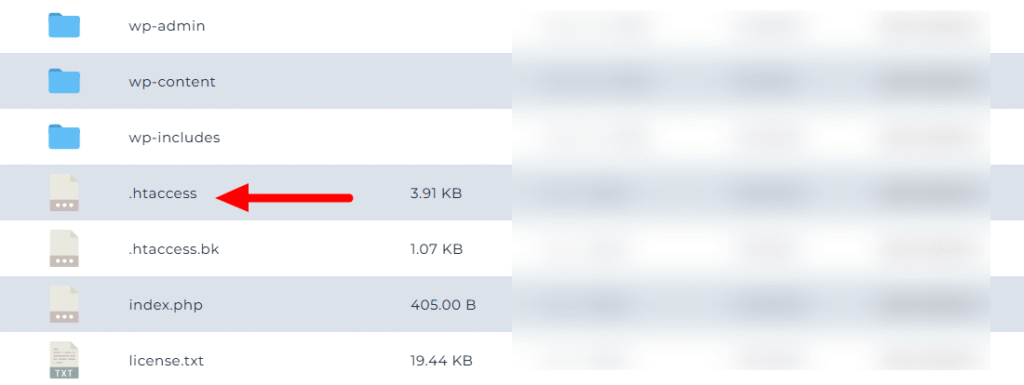
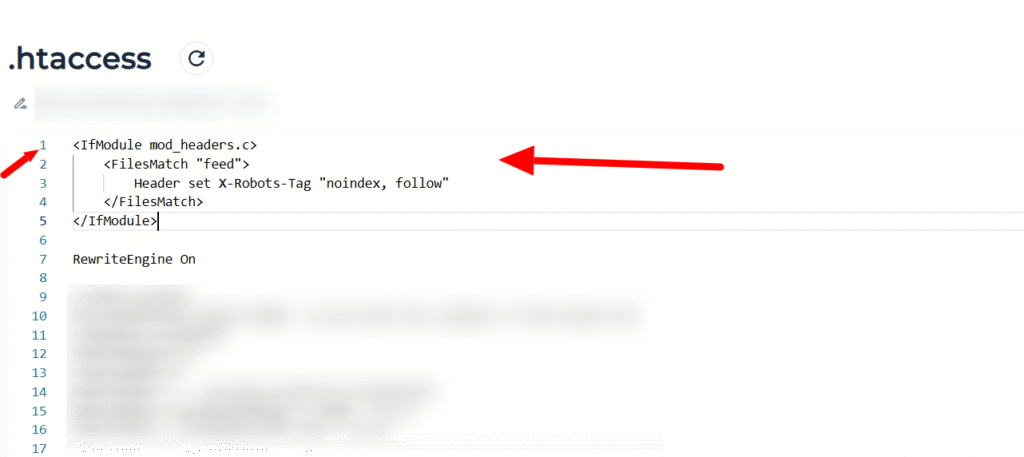
you can edit your website .htaccess – available in public_html folder of your wordpress website – and then add this code to top of that
<IfModule mod_headers.c>
    <FilesMatch "feed">
        Header set X-Robots-Tag "noindex, follow"
    </FilesMatch>
</IfModule>
in this image i show you where you should put it correctly:
📌 Note:
This method is efficient and doesn’t rely on WordPress hooks. Make sure the mod_headers module is enabled on your server. and your webserver is apache, if you have other webservers like nginx, you should use first method and do it with php.
Optional: Disallow Feeds in robots.txt
While robots.txt alone doesn’t prevent indexing of already-known URLs, it’s still useful to block unnecessary crawling. Add this to your robots.txt file in order to disallow search engines to crawl /feed pages content and get better result in order to noindex wordpress feed urls :
Disallow: /feed/
Disallow: /*/feed/
add these lines at the end of robots.txt file to block crawl feeds in wordpress by robots.txt
DO NOT use <meta> tag on Feeds
Feeds are XML documents, not HTML pages, so they don’t have a <head> section. That means adding meta tags in wp_head has no effect on feed URLs.
// This will NOT work for feeds
add_action('wp_head', function() {
    if (is_feed()) {
        echo '<meta name="robots" content="noindex, follow">';
    }
});
Double Check No Index Feed WordPress
To ensure your WordPress feed URLs aren’t indexed by search engines:
- Use the
X-Robots-Tagheader withsend_headersin PHP. - Or configure Apache’s
.htaccessfor a server-level solution. - Optionally, add rules to
robots.txtto limit crawling.
This approach helps you maintain clean, SEO-friendly search results while keeping your RSS functionality intact.